Invoices
In Audienced, you have a centralized overview of:
- issued invoices,
- payment history,
- the status of each invoice.
All information is available in the Subscription section.
Where to find invoices and payments
In the admin dashboard, go to:
Subscription → Invoice history
This section displays a table with all available invoices.
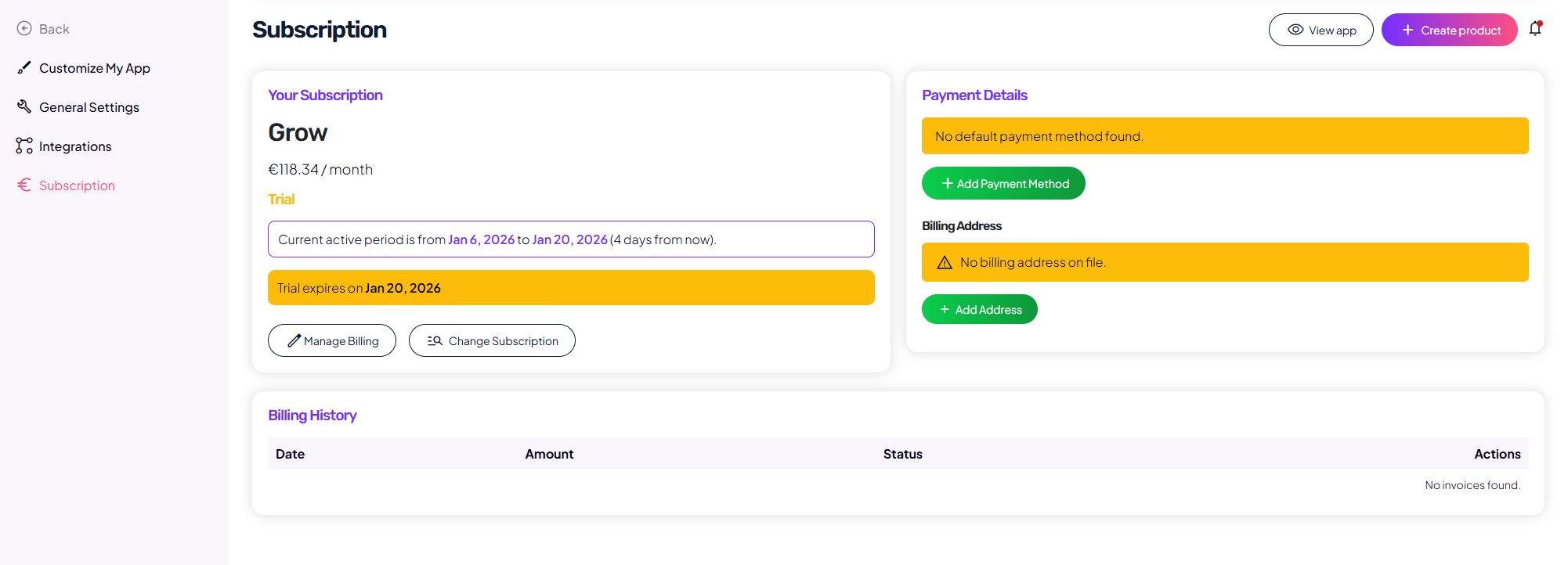
What the invoice history shows
For each invoice, the following information is shown:
- Issue date,
- Amount,
- Status (for example: paid),
- Actions (such as viewing or downloading the invoice).
If no invoices are available yet, you will see the message No invoices found.
When an invoice is issued
An invoice is issued:
- after a successful subscription payment,
- at the start of a new billing period (monthly or yearly),
- after a successfully completed trial, if a payment method is added.
Invoices are generated automatically.
Billing details and invoice validity
To issue a valid invoice, the following must be provided:
- billing details (billing address),
- correct company or individual information.
If billing details are missing:
- the system displays a warning,
- the invoice cannot be properly generated until the information is completed.
Downloading an invoice
When an invoice is available:
- click the relevant action in the invoice row,
- you can view or download the invoice for your records.
Frequently asked questions
Why don’t I see any invoices yet?
Invoices appear only after the first successful payment or after the trial period ends.
Can I edit an already issued invoice?
No. Issued invoices are final documents. If you need changes, update your billing details before the next billing cycle.
Will I also receive the invoice by email?
Invoices are always available in the dashboard. Email delivery may occur with a delay.
Summary
- invoices and payments are available in the Subscription section,
- invoices are generated automatically,
- valid invoices require complete billing details,
- the history shows all issued invoices and their statuses.